Overview of JADE architecture#
The scope of this section is to describe the architecture of JADE. The section is intended for new developers that need to familiarize with the codebase or for users that are just more curious to know a bit more of how JADE works.
Note
If you do not have time for this and you just want to add a new benchmark using the already available table and plot types, you do not need to know how JADE works. You can easily skip directly to the First steps section.
JADE V&V ecosystem#
This documentation describes what we usually refer as the “JADE engine”. However, this is only a part of the JADE V&V ecosystem.
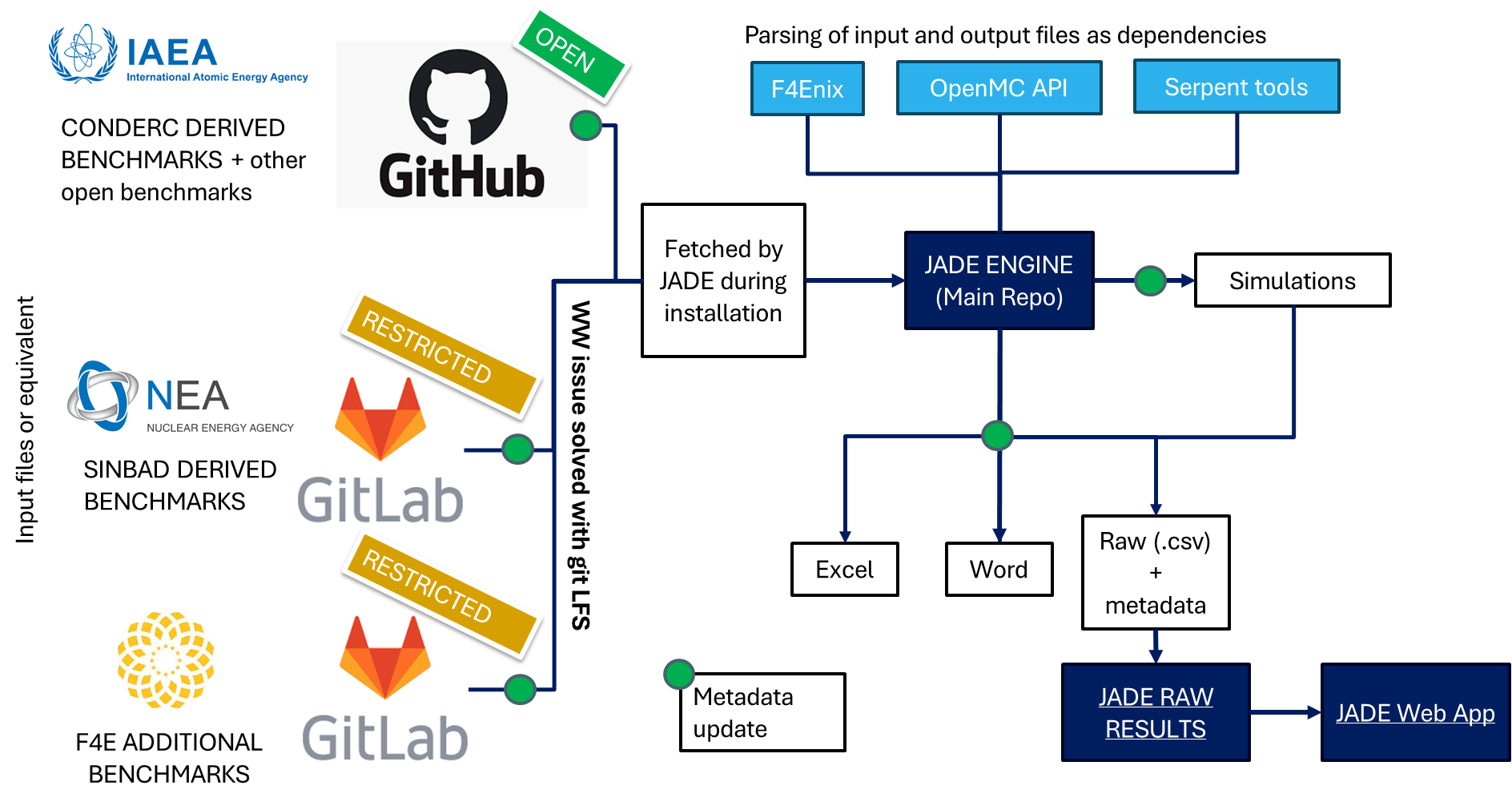
The three repositories fully owned by the JADE team are:
JADE: the main repository containing the engine.
JADE-RAW-RESULTS: where the raw results processed by JADE can be uploaded by the different users in order to have a centralized database and avoid duplication of efforts.
JADE-WEB-APP: which stores a web application that allows to interactively plot the benchmark results using the data contained in the JADE-RAW-RESULTS repository. This allows to easily compare the results of different benchmarks and different codes without the need to install JADE. The level of post-processing detail is lower than the one provided by JADE engine processor, but it has the advantage of being interactive and easy to use.
Moreover, it can be seen how two further important functions have been separated from the JADE engine scope. The first is the storage and version control of the benchmark inputs. Depending on the distribution policy, these are stored either in the IAEA repository, in the SINBAD project GitLab or in the F4E GitLab.
The second function is the parsing of simulation input and output files. Parsers of this type are transport-code dependent and have much more use cases beyond JADE. MCNP and D1UNED files are parsed using F4Enix, OpenMC files are parsed using their native Python API while Serpent files are parsed thanks to serpentTools.
High level overview#
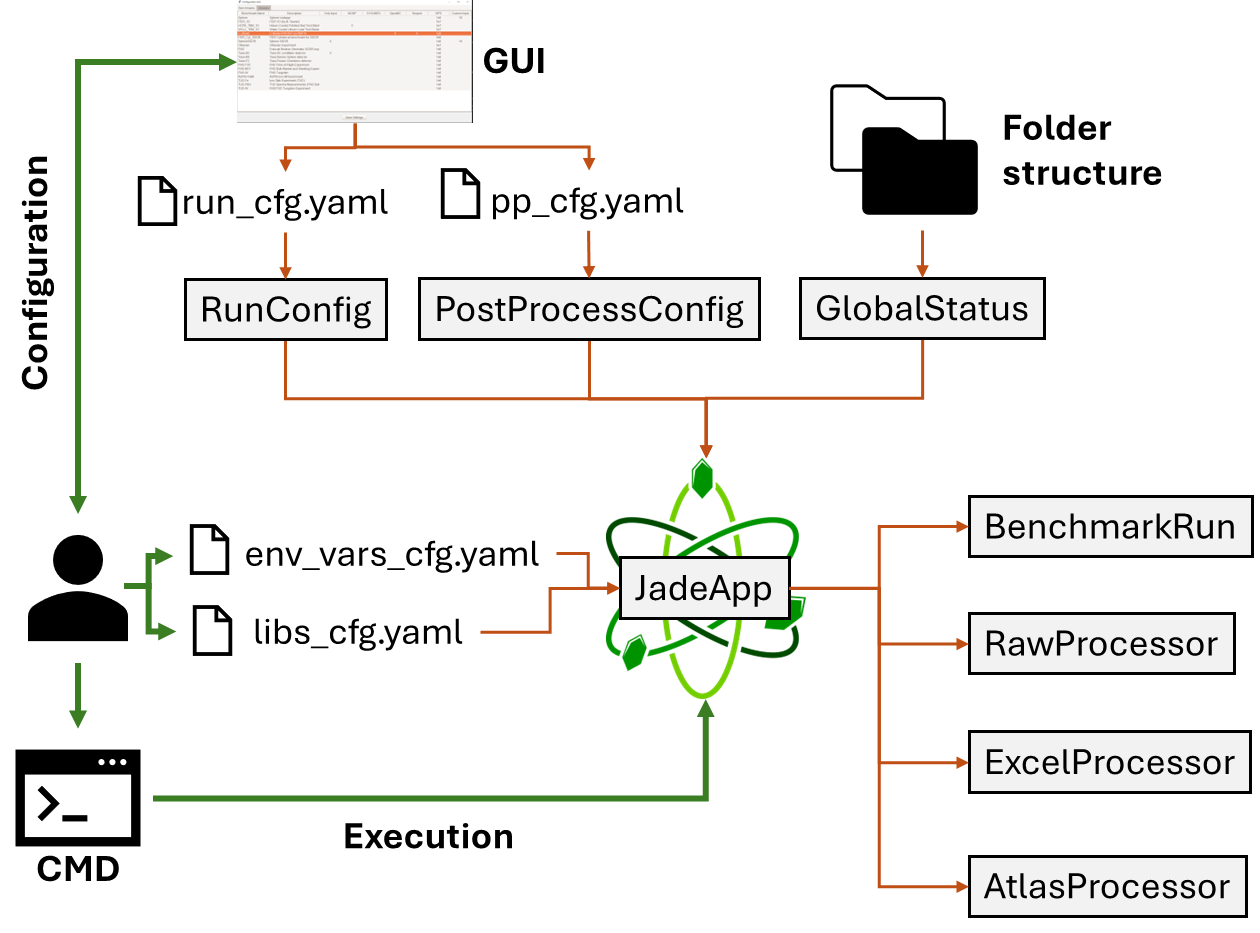
The picture above describes the highest level of JADE architecture. As it can
be seen, users only interact with 4 main configuration files that are better
described in the Configure JADE section. Of these, only the ones related to
environmental variables and libraries should be manually modified. Instead, due to
their complexity, the files controlling jade benchmarks executions and
post-processing should be modified through the provided GUI. All this information,
together with the benchmark specific configurations and the status of the
local JADE installation (i.e. the contents of the folder structure) are fed into
the JadeApp class which controls all JADE operations.
JADE App#
The JadeApp class is the main class of JADE. All entry points contained in the
src/__main__.py and src/utilities.py files are connected to methods
of this class. The App is responsible for the following tasks:
parsing and storing all the configuration options (through specific data classes)
install jade folder structure at the first run (including input fetching). Paths are stored in the
PathsTreeclassparse and store information regarding which simulations have been already performed and which data has been already raw processed (through the
GlobalStatusclass)perform the benchmark execution through the
BenchmarkRunclassperform the raw processing through the
RawProcessorclassperform the post-processing through the
ExcelProcessorandAtlasProcessorclasses
In the following sections, the different branches of JADE execution and post-processing are described in more detail.
Benchmark execution architecture#
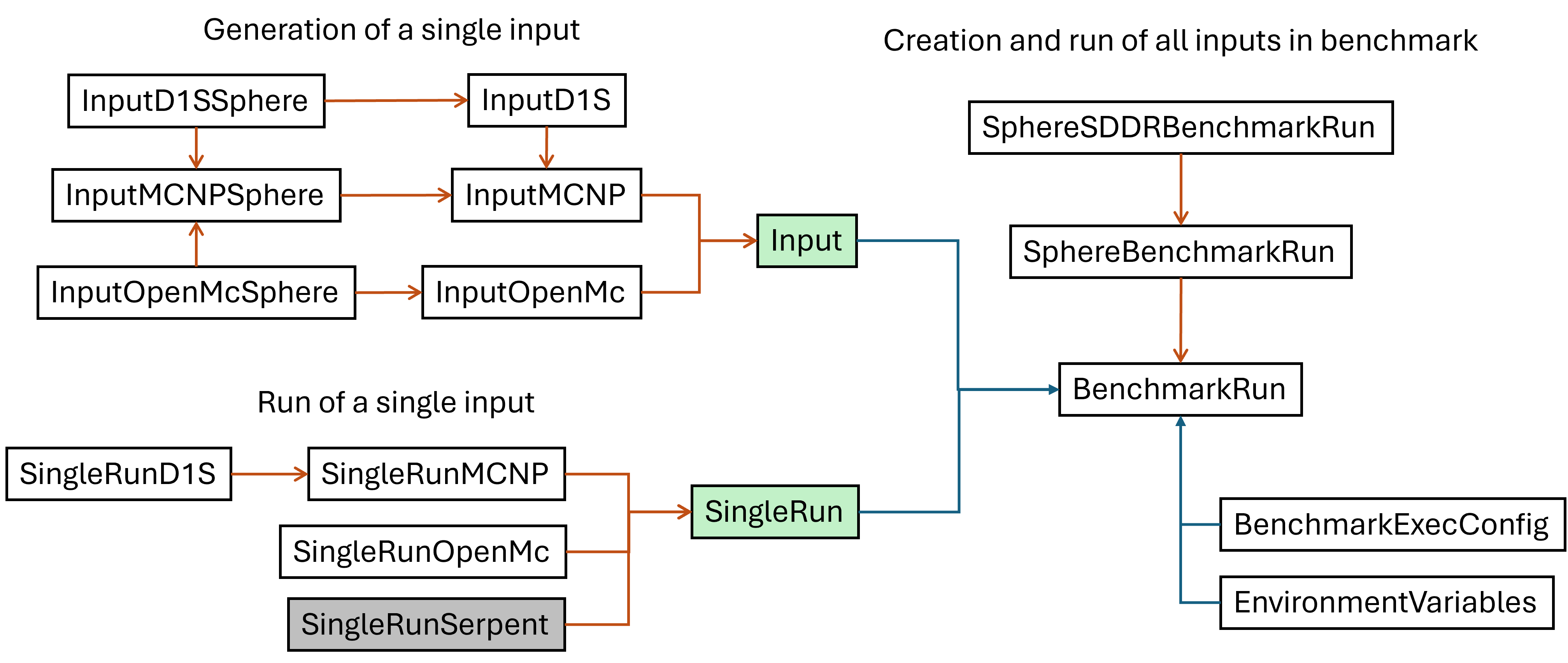
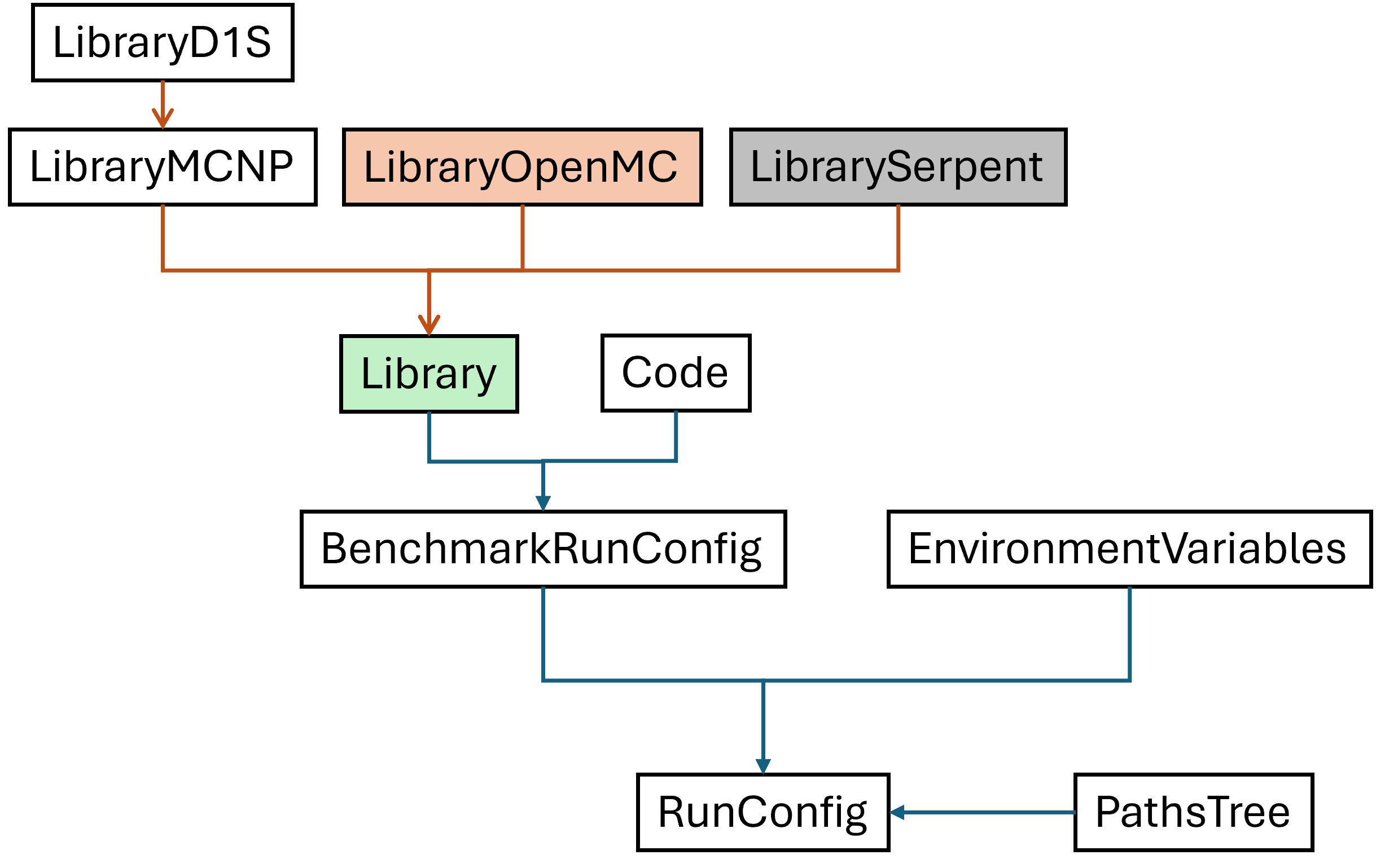
The core object controlling one benchmark execution is the BenchmarkRun class
(src/jade/run/benchmark.py). This object receives information about which benchmarks and
which code-library combinations should be run and it generate the inputs and runs them
depending on the transport code that needs to be used. Indeed, the two main interfaces for
the BenchmarkRun are the abstract classes Input and SingleRun.
Children for these classes need to be implemented for each transport code that JADE
supports. Chilldren of Input are responsible for generating the input files,
while children of SingleRun are responsible for running one simulation (i.e.
a single case of the benchmark).
The following is the architecture behind the run configuration. Note that a subclass of the
Library needs to be implemented for each supported transport code.
Raw processing architecture#
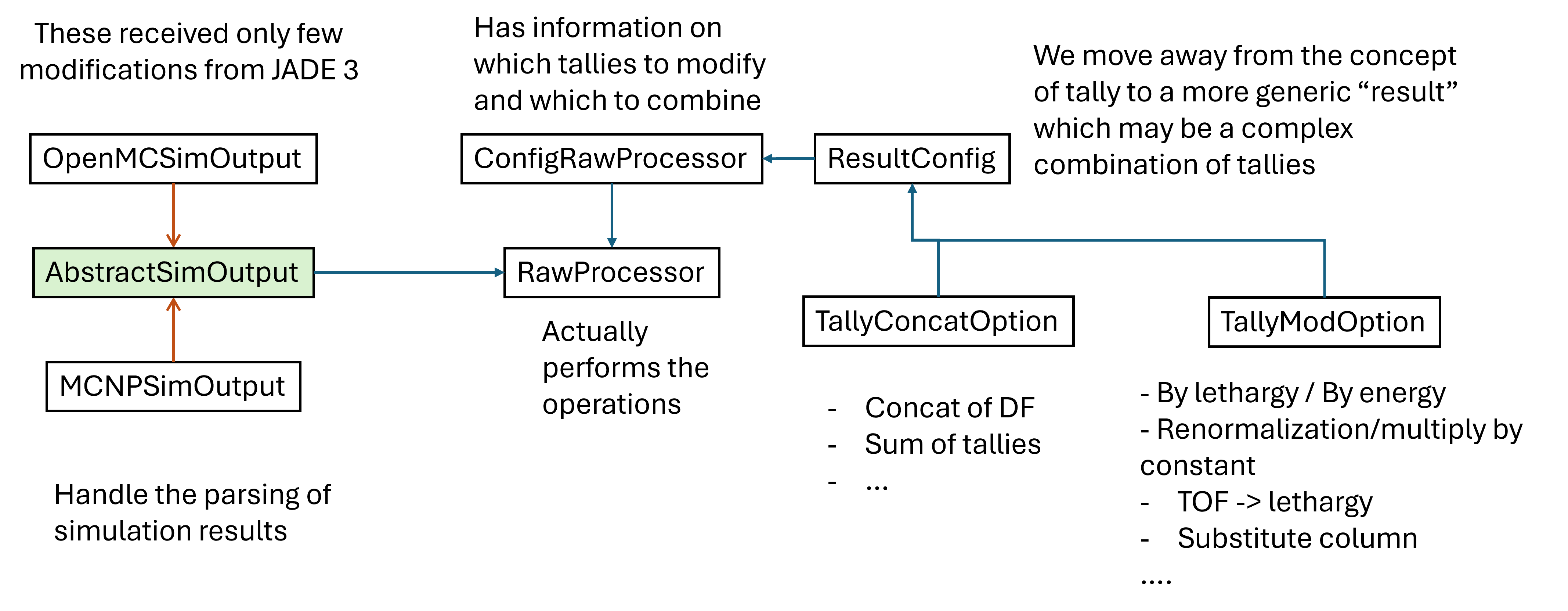
The main class of the raw processing branch is the RawProcessor
(src/jade/post/raw_processor.py). This class receives information on which benchmarks
have been simulated but not processed yet, parses such results and creates the
general .csv raw data files which have the same structure independently from the
transport code used. The actual parsing of the output files is handled by transport code
specific implementations of the abstract class AbstractSimOutput.`
Excel processing architecture#
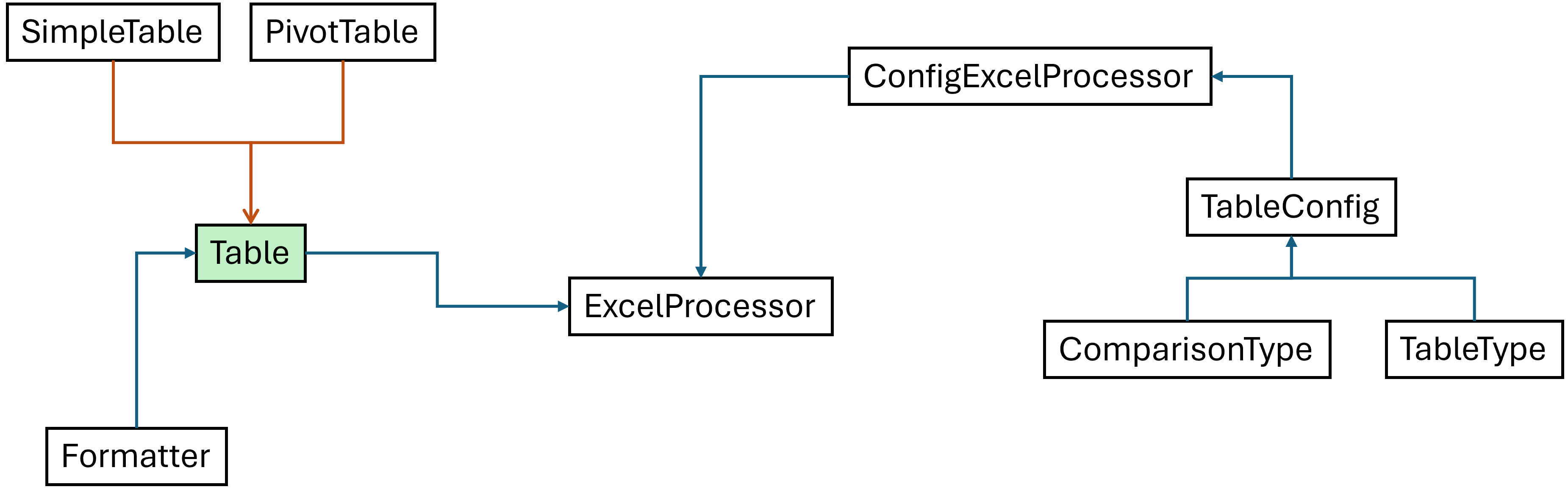
The main class to the excel processing branch is the ExcelProcessor
(src/jade/post/excel_processor.py). This class receives information on which code-lib
results should be compared and produces the comparison excel files.
The minimal unit of an excel comparison is a Table which is responsible of taking
a reference and target DataFrame results and compare them according to the information
stored in the corresponding TableConfig object in order to produce an Excel sheet.
The Table is abstract.
Atlas processing architecture#
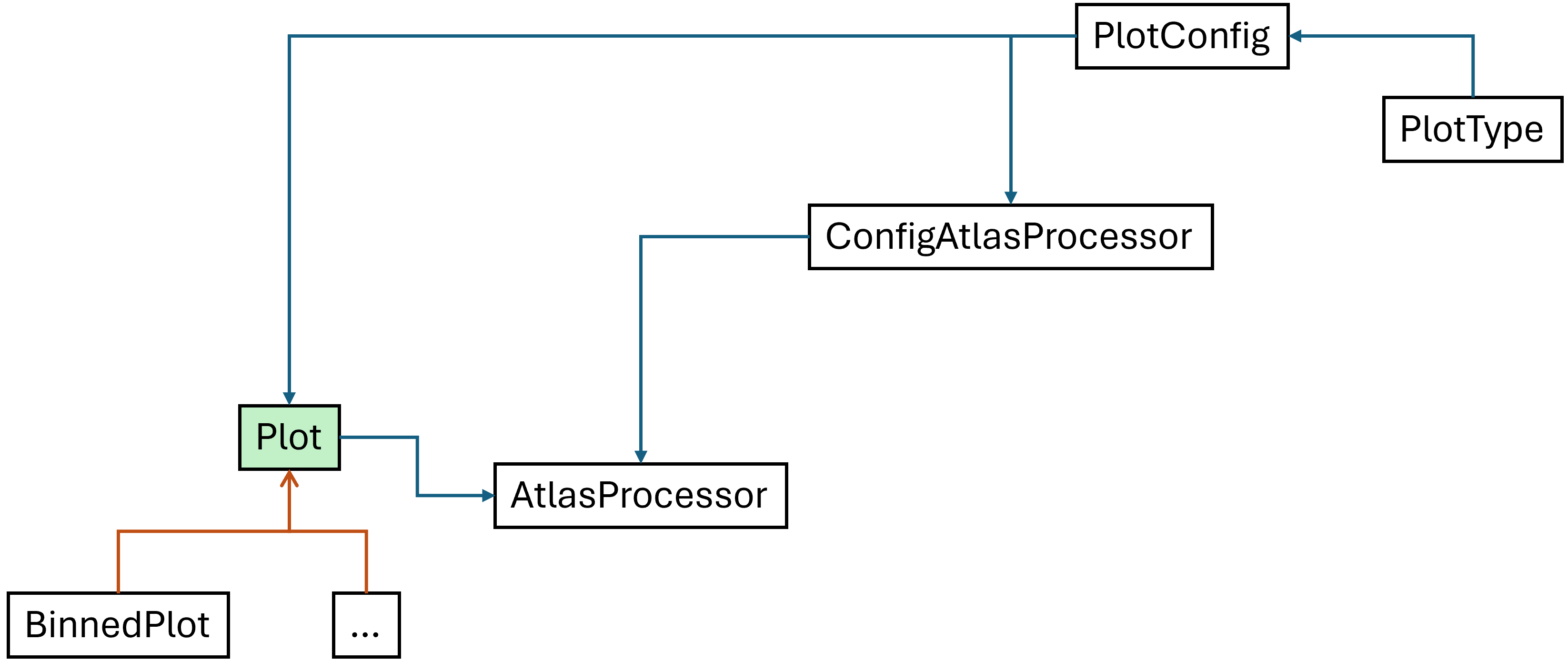
The main class to the atlas processing branch is the AtlasProcessor
(src/jade/post/atlas_processor.py). As it can be seen, the structure is very similar to the
one of the excel processing branch. The main difference is that the minimal unit of an atlas
is a Plot instead of a Table. The Plot is abstract.